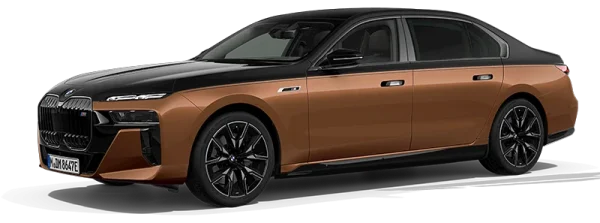
BMW 7 Series
- Same OEM files as the dealer
- FSC code generated per VIN within 1 hour
- Step-by-step PDF guide in every order
- Lifetime WhatsApp support included
Description
BMW 7 Series Map Update | F01, F02, G11, G12, G70
BMW 7 Series owners expect every system in the vehicle to work without compromise — and navigation is no exception. Outdated maps mean routing errors on roads that have changed, incorrect speed limit alerts on modified roads, and missing junctions that have opened since the last map release. For a flagship model built around precision, this is not acceptable.
This page covers the complete map update package for every BMW 7 Series from 2010 to present — F01 and F02 through G70 — across all factory navigation systems. The F01 and F02 received CIC and then NBT across a seven-year production run. The G11 and G12 introduced EVO ID5 and ID6. The G70 runs MGU iDrive 8 from launch. Each system requires a different update and the correct one is confirmed from your VIN before anything is generated.
Select your delivery method, region, and FSC type from the dropdowns. Enter your 17-character VIN at checkout — we confirm your exact system and map type before generating anything.
Which Navigation System Does Your BMW 7 Series Have?
The BMW 7 Series has spanned three chassis generations since 2010, each receiving different factory navigation hardware. The F01 and F02 alone had two different head units depending on build date. VIN confirmation is the only fully reliable method for vehicles near any production transition.
| Chassis | Body | Build period | Head unit | Map type | Notes |
| F01 | Saloon (SWB) | Nov 2008–Jul 2012 | CIC | Premium / Move / Motion | CIC debuted on F01 — VIN confirms map type |
| F02 | Saloon (LWB) | Nov 2008–Jul 2012 | CIC | Premium / Move / Motion | VIN required |
| F01 | Saloon (SWB) | Jul 2012–Jun 2015 | NBT | NEXT | Production switch Jul 2012 — VIN required near boundary |
| F02 | Saloon (LWB) | Jul 2012–Jun 2015 | NBT | NEXT | VIN required |
| G11 | Saloon (SWB) | 2015–2019 | EVO ID5/ID6 | EVO ID5/ID6 maps | G11 launched with NBT EVO — first BMW with gesture control standard |
| G12 | Saloon (LWB) | 2015–2019 | EVO ID5/ID6 | EVO ID5/ID6 maps | VIN confirms ID5 vs ID6 |
| G11 LCI | Saloon (SWB) | 2019–2022 | MGU18 iDrive 7 | LIVE Maps | MGU iDrive 7 — LIVE = global, JOY = N. America |
| G12 LCI | Saloon (LWB) | 2019–2022 | MGU18 iDrive 7 | LIVE / JOY | VIN required |
| G70 | Saloon (LWB only) | 2022–2025 | MGU iDrive 8/8.5 | JOY | All G70 standard. iDrive 8.5 from mid-2023+ |
The F01 and F02 are the most commonly misidentified for 7 Series map orders. CIC ran from November 2008 and NBT replaced it from July 2012 — both show a similar interface at first glance. The iDrive version screen is the definitive check. For G11 and G12, the pre-LCI (EVO ID5/ID6) and LCI (MGU iDrive 7) look different enough to distinguish visually, but VIN at checkout removes any uncertainty before code generation.
How to Check Your Map Type on Screen
Use the exact path for your system — these are not interchangeable:
- CIC (F01/F02, Nov 2008–Jul 2012): NAV → Options → Settings → Position and map version
- NBT (F01/F02, Jul 2012–Jun 2015): NAV → Options → Settings → Position and version history → Check version
- EVO ID5/ID6 (G11/G12, 2015–2019): NAV → Options → Navigation system version
- MGU iDrive 7 (G11/G12 LCI, 2019–2022): Maps → Settings → Location and version → Map version
- MGU iDrive 8/8.5 (G70, 2022–2025): Navigation → Settings → Map version
What the result means:
| Screen shows | Your system | Update needed |
| PREMIUM [Region] [Year] | CIC with Premium maps | CIC Premium map update |
| MOVE [Region] [Year] | CIC with Move maps | CIC Move map update |
| MOTION [Region] [Year] | CIC with Motion maps | CIC Motion map update |
| NEXT [Region] [Year] | NBT | NEXT map update |
| Road Map [Region] [Year] | EVO ID5 or ID6 | EVO update — VIN confirms which |
| LIVE [Region] [Year] | MGU iDrive 7 — global regions | LIVE map update |
| JOY [Region] [Year] | MGU iDrive 7 or 8/8.5 — global regions | JOY map update |
If the screen path does not match your iDrive or the result is unclear, enter your VIN at checkout — we identify your exact factory specification before generating any code.
What Every Package Includes
Every BMW 7 Series map update order includes:
- Latest map data for your selected region and map type — current release
- VIN-specific FSC activation code — generated against your 17-character VIN. Non-refundable once generated.
- Step-by-step installation instructions for your exact navigation system
Choose from the dropdowns on this page:
- Delivery method — Instant download (map file link by email) or Pre-loaded USB shipment (USB arrives ready to install — most popular, no file preparation needed)
- Region — Europe West, Europe East, North America, Middle East, Australia and New Zealand, Southeast Asia, South America, Southern Africa, Northern Africa, Taiwan, Turkey, India, Israel, Japan, Argentina
- FSC type — Lifetime FSC (one payment, all future releases for this vehicle) or One-time FSC (current release only)
FSC code delivered by email within 30 minutes of VIN verification at checkout. Orders processed 24/7.
Map Update Packages — All BMW 7 Series Navigation Systems
CIC Premium — F01, F02 (November 2008–July 2012)
Applies where the iDrive version screen shows PREMIUM [Region] [Year]. CIC was first introduced on the F01 and F02 7 Series in November 2008 — the flagship was the first BMW to receive it. Package includes latest Premium map release for your region plus FSC code. USB: FAT32, no larger than 64GB.
One-time or Lifetime FSC — select from dropdown.
CIC Move — F01, F02 (where Move maps were factory-fitted)
Applies where the version screen shows MOVE [Region] [Year]. A portion of F01 and F02 vehicles were factory-fitted with Move navigation rather than Premium. Move and Premium are not interchangeable on CIC. Package includes latest Move release plus FSC code. USB: FAT32, no larger than 64GB.
One-time or Lifetime FSC — select from dropdown.
CIC Motion — F01, F02 (where Motion maps were factory-fitted)
Applies where the version screen shows MOTION [Region] [Year]. Entry-level CIC map type in some markets. Package includes latest Motion release plus FSC code. USB: FAT32, no larger than 64GB.
One-time or Lifetime FSC — select from dropdown.
NBT NEXT — F01, F02 (July 2012–June 2015)
Applies where the version screen shows NEXT [Region] [Year]. NBT replaced CIC on the F01 and F02 from July 2012 — the same production switch affected multiple series simultaneously. NEXT is not compatible with CIC or EVO systems. Package includes latest NEXT release for your region plus FSC code. USB: FAT32, no larger than 64GB.
One-time or Lifetime FSC — select from dropdown.
EVO ID5/ID6 — G11, G12 (2015–2019)
The G11 and G12 7 Series launched in 2015 with NBT EVO — the generation that introduced gesture control as standard on a BMW for the first time. EVO ID5 and ID6 both display Road Map [Region] [Year] on screen — VIN at checkout distinguishes which applies before any code is generated. Package includes latest EVO map release plus FSC code. USB: FAT32, no larger than 64GB.
Lifetime FSC only.
MGU iDrive 7 (LIVE/JOY) — G11 LCI, G12 LCI (2019–2022)
The G11 and G12 LCI introduced MGU iDrive 7 across all trims. Screen shows LIVE [Region] [Year] for most global regions or JOY [Region] [Year] for North America. VIN confirms LIVE versus JOY before code generation. Package includes latest LIVE or JOY map release plus FSC code.
One-time or Lifetime FSC — select from dropdown.
LIVE map update: BMW/MINI LIVE Map Update
MGU iDrive 8/8.5 (JOY) — G70 (2022–2025, all trims)
All G70 7 Series come with MGU iDrive 8 from launch. iDrive 8.5 arrived from approximately mid-2023. Screen shows JOY [Region] [Year]. The G70 is only available in long-wheelbase form — there is no SWB variant. Package includes latest JOY map release plus FSC code.
One-time or Lifetime FSC — select from dropdown.
How to Install Your BMW 7 Series Map Update
Step-by-step instructions are included with every order. The process below covers CIC, NBT, EVO, and MGU systems. LIVE and JOY (MGU iDrive 7 and 8) follow the same USB process as EVO.
Pre-Loaded USB Shipment (most popular)
- Receive your USB
USB arrives with the map file already loaded. No download or formatting needed.
- Insert into iDrive USB port
Engine running or ignition on. Insert USB into your BMW 7 Series iDrive USB port.
- Follow the on-screen prompt
CIC and NBT: NAV → Options → Update maps. EVO: NAV → Options → Navigation system version → Start update. MGU iDrive 7: Maps → Settings → Start update. MGU iDrive 8/8.5: Navigation → Settings → Start update.
- Enter FSC code when prompted
Enter the FSC code from your order email. EVO and MGU systems read the code from the USB automatically — no manual entry needed.
- Wait for completion
Do not remove USB or switch off engine during installation. CIC/NBT: 20–45 minutes. EVO: 15–30 minutes. MGU: 10–25 minutes. System confirms completion on screen.
- Verify new version
Check the version screen using the same iDrive path used to identify your system. Confirm the new map version and release year are displaying correctly.
Instant Download
- Download map file
Download from the link in your order confirmation email.
- Prepare USB drive
Format to FAT32, maximum 64GB. Copy map file to the root — not inside a folder.
- Insert and update
Follow the same on-screen steps from Step 3 above.
If any step does not match what you see on screen, contact us via 24/7 Live Chat. We guide you through your specific system at no extra charge.
BMW 7 Series Navigation Region Change
If your BMW 7 Series was imported and the navigation shows maps for the wrong country — for example a Middle East-spec G11 now used in Europe — this is a region change, not a standard map update. Full details available on the BMW Navigation Region Conversion page.
Additional Services for the BMW 7 Series
Apple CarPlay Activation
CarPlay activation is available for G11 and G12 (2015–2019) with EVO ID5 or EVO ID6 only. CIC and NBT (F01/F02) do not support CarPlay. MGU iDrive 7 (G11/G12 LCI) and MGU iDrive 8 (G70) do not support CarPlay activation via standard FSC method.
- EVO ID5/ID6 — G11/G12 2015–2019: Firmware H–M USB only. Firmware N–O USB with full-screen. Firmware P–Y ENET cable with full-screen. China/HK/Macau/Japan/Korea: ENET always regardless of firmware.
Full details and ordering: Apple CarPlay activation page.
Video in Motion
Enables video playback on the iDrive screen while driving. Available for F01/F02 NBT systems and G11/G12 EVO systems.
NBT systems: Video in Motion for NBT
EVO systems: Video in Motion for EVO
MGU systems: Video in Motion for MGU
Frequently Asked Questions
Which navigation system does the BMW F01 7 Series have?
The F01 and F02 7 Series received two different head units depending on build date. CIC was fitted from November 2008 to July 2012, using Premium, Move, or Motion maps depending on factory specification. NBT replaced CIC from July 2012 through to the end of F01/F02 production in 2015, using NEXT maps. The iDrive version screen confirms which system your vehicle has — CIC shows PREMIUM, MOVE, or MOTION; NBT shows NEXT. VIN at checkout confirms the exact map type before any code is generated.
What navigation does the BMW G11 7 Series have?
The G11 and G12 (2015–2019) launched with NBT EVO — the generation that introduced gesture control as standard. The version screen shows Road Map [Region] [Year] for both EVO ID5 and ID6. The G11 and G12 LCI (2019–2022) moved to MGU iDrive 7, which shows LIVE or JOY depending on region. VIN at checkout is the reliable confirmation before any code is generated.
What navigation does the BMW G70 7 Series have?
All G70 7 Series from 2022 onward come with MGU iDrive 8 as standard across all trims. iDrive 8.5 was introduced from approximately mid-2023. The map type is JOY for North America and LIVE for most other global regions — VIN confirms which applies. The G70 is the first 7 Series available only in long-wheelbase form with no SWB option.
Can I upgrade my F01 7 Series from CIC Premium to NEXT maps?
No. A BMW navigation system accepts only the map type factory-installed in that vehicle. An F01 with CIC Premium maps cannot install NEXT maps — that requires NBT hardware which the CIC-equipped F01 does not have. The factory map lock is absolute for every 7 Series chassis.
What is included in the BMW 7 Series map update package?
Every order includes the latest map data for your selected region, the VIN-specific FSC activation code, and step-by-step installation instructions. Choose delivery method (instant download or pre-loaded USB shipment), region, and FSC type (Lifetime or One-time) from the dropdowns on this page. The FSC code is delivered by email within 30 minutes of VIN verification at checkout.
Does a BMW 7 Series map update require a dealer visit?
No. CIC, NBT, EVO ID5/ID6, and MGU updates all install via the standard iDrive USB port using the vehicle’s built-in map update function. Pre-loaded USB: insert and follow the on-screen prompt. Instant download: format a FAT32 USB (no larger than 64GB), copy the map file, then follow the prompt. No dealer, no coding tool, no BMW ConnectedDrive subscription required.
Do you cover all regions for BMW 7 Series map updates?
Yes. All regions where BMW releases map data are covered: Europe West, Europe East, North America, Middle East, Australia and New Zealand, Southeast Asia, South America, Southern Africa, Northern Africa, Taiwan, Turkey, India, Israel, Japan, and Argentina. Select your region from the dropdown. VIN confirms regional compatibility before any code is generated.
What if I select the wrong map type for my 7 Series?
Contact us via 24/7 Live Chat before the FSC code is generated. Once a code is issued against your VIN it is locked to that vehicle and map type and cannot be reissued. VIN verification before generation prevents most errors — if your VIN reveals a different system than selected, we correct the order before proceeding.
Get your VIN-specific BMW 7 Series map update — latest 2025/2026 map data, FSC code, and installation instructions included. Choose instant download or pre-loaded USB shipment. Select region and FSC type from the dropdowns above, then enter your VIN at checkout. FSC code delivered by email within 30 minutes.
Additional information
| Car Model | 2010, 2011, 2012, 2013, 2014, 2015, 2016, 2017, 2018, 2019, 2020, 2021, 2022, 2023 |
|---|---|
| Delivery Method | Online Download, USB Shipment |
| Fsc Code Type | One Time, Life Time |
| Region | Argentina, Australia & New Zealand, China/HongKong/Macau, Europe East/West, India, Israel, Japan, Korea, Middle East, North Africa, North America, South Africa, South America, South East Asia, Taiwan, Turkey |
Reviews
There are no reviews yet.